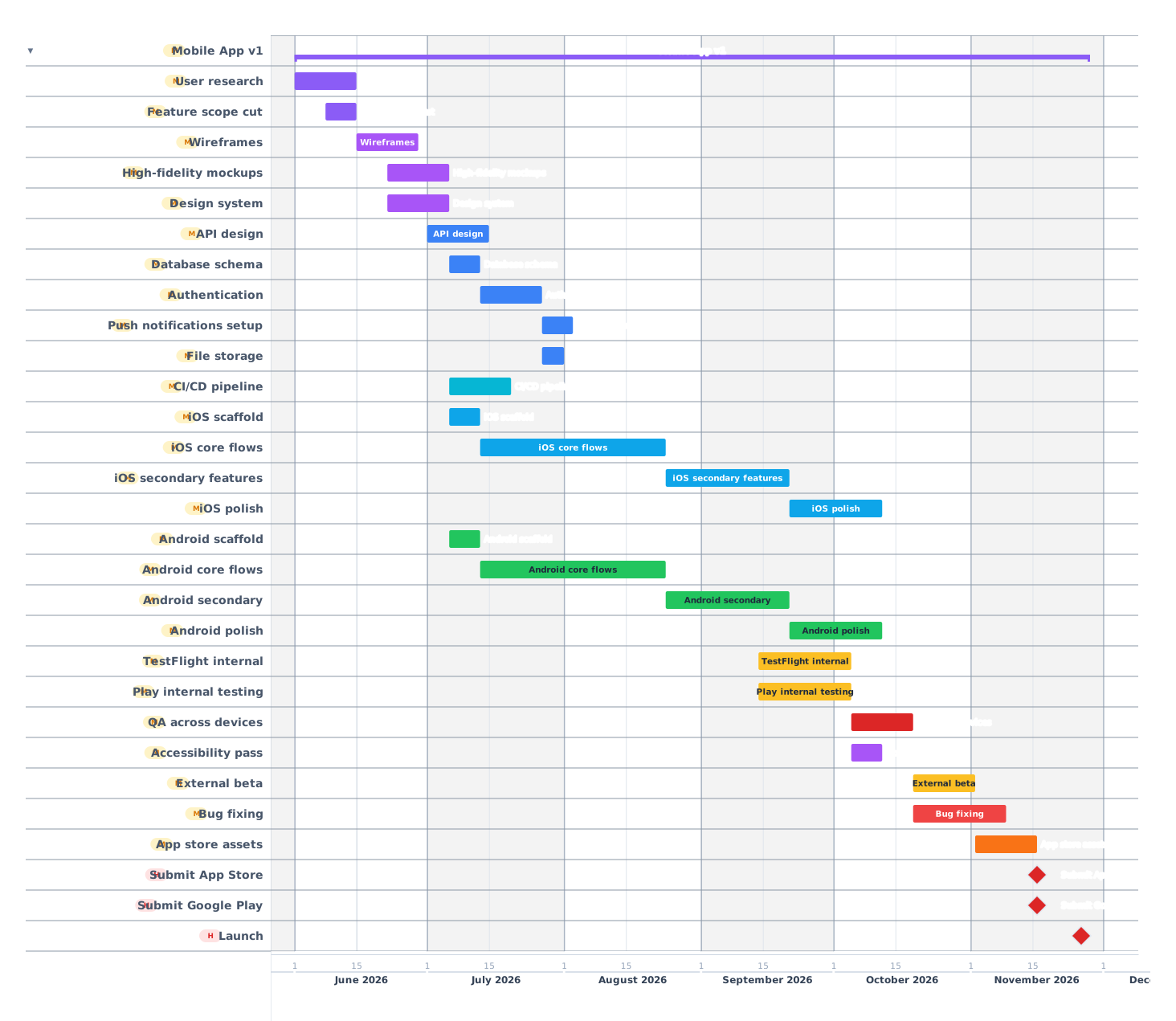
A 6-month mobile app build covering discovery, design, iOS and Android development, backend, testing, app-store review and launch, with the submission timeline that breaks most schedules.
Mobile App Development29 tasks · 6 phases · 6 months
About this template
Mobile apps are software with two extra constraints: dual-platform development and app-store approval. Apple's review queue is usually 1–3 days now but can stretch to a week, and rejection on a launch-week submission can shift the whole launch. This 6-month template covers a typical first-version app for iOS and Android with a backend API, with realistic time for both platforms and app-store submission.
How a 6-month mobile app build breaks down
01
Discovery and design
Month 1
User research, feature list, scope cut. Wireframes for every screen. High-fidelity design for primary flows. Design system: colors, typography, components. iOS and Android often share design language but follow each platform's conventions (tab bar vs. bottom nav patterns, etc).
User research and interviews
Feature list and scope cut
Wireframes (every screen)
High-fidelity mockups
Design system
Prototype clickthroughs
02
Backend foundation
Months 2–3
API design (REST or GraphQL). Database schema. Authentication (email, OAuth, Sign in with Apple: required if you offer other social sign-ins). Push notification infrastructure (APNS for iOS, FCM for Android). File storage. Hosting and CI/CD.
API design
Database schema
Authentication
Push notifications (APNS, FCM)
File storage
CI/CD pipeline
03
iOS development
Months 2–5
Swift or React Native. Build core flows first, polish later. Use TestFlight for internal builds from week 4. Test on real devices: simulator does not catch performance, battery, or network-edge issues. Plan for at least 3 supported iOS versions.
Project scaffold
Core flows
Secondary features
iOS-specific polish (haptics, animations)
TestFlight internal
TestFlight external beta
04
Android development
Months 2–5
Kotlin or React Native (same codebase). Match the iOS feature set. Test across multiple Android versions and device sizes: fragmentation is real. Material Design 3 components. Use Google Play internal testing track for builds.
Project scaffold
Core flows
Secondary features
Android-specific polish
Google Play internal testing
Google Play closed beta
05
Test and polish
Month 5
QA across devices and versions. Accessibility pass: VoiceOver (iOS), TalkBack (Android), dynamic type, color contrast. Performance: cold start, scroll, memory. Beta cohort of 50–200 testers across both platforms.
QA across devices
Accessibility pass
Performance optimization
Beta cohort feedback
Bug fixing
06
App-store submission and launch
Month 6
App-store assets: screenshots (multiple device sizes), preview videos, description, keywords. Privacy nutrition labels for iOS. Data safety form for Android. Submit to both stores at the same time: Apple review is 1–3 days; Google Play is usually a few hours. Plan a buffer week for rejections.
App-store screenshots and copy
iOS privacy nutrition labels
Android data safety form
Submit to App Store
Submit to Google Play
Address review feedback if rejected
Launch in both stores
Tips from shipped mobile apps
01Submit to both stores 2 weeks before public launch. The buffer absorbs rejections without shifting launch.
02Test on real devices from week 4. Simulators do not catch battery, performance, or network-edge issues.
03Add Sign in with Apple if you offer any other social sign-in. App Store guidelines require it.
05Use the platform conventions. iOS-on-Android-tab-bar is a small but real reviewer flag.
Frequently asked questions
How long does mobile app v1 take?
4–9 months for native iOS + Android, depending on feature scope. This template targets the 6-month middle case. Cross-platform (React Native, Flutter) shortens by 20–30%.
How long is App Store review?
1–3 days for most submissions in 2026. First submissions are sometimes longer. Plan 1 week of buffer for potential rejections.
Should I launch both platforms at the same time?
Yes if possible: splitting press across two launches reduces impact. Submit both, sync the actual public launch date.
 Gantt Chart Maker