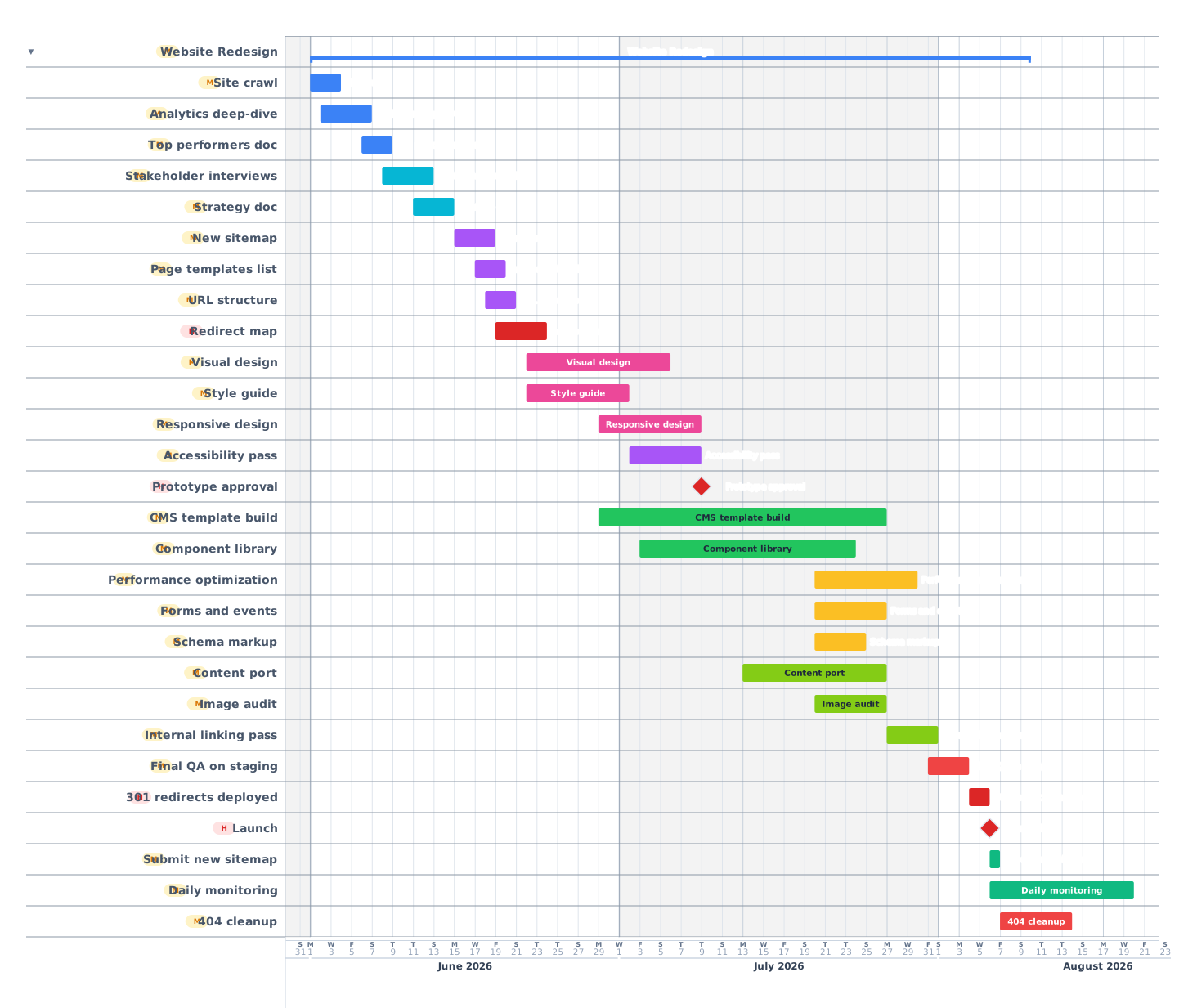
A 10-week website redesign covering audit, strategy, IA, design, development, content migration, QA, SEO redirects and launch, built around the SEO continuity that decides whether traffic survives the cutover.
Website redesigns lose 20–60% of organic traffic when they ship without a redirect map. They lose conversion when the new design ships without the things that made the old design work. This 10-week template covers a typical marketing-site redesign: audit, IA, design, development, content migration, SEO continuity, and the post-launch monitoring window where traffic recovers or does not.
How a 10-week redesign breaks down
01
Audit and strategy
Weeks 1–2
Crawl the existing site (every URL, every page, every form). Pull analytics and search-console data: what pages drive traffic, what queries, what conversions. Document the things that are working so they are preserved in the new design. Strategy doc: redesign goals, success metrics, scope.
Full site crawl
Analytics and Search Console deep-dive
Document top-performing pages
Stakeholder interviews
Strategy doc and approval
02
Information architecture
Week 3
New sitemap based on user intent and the strategy doc. Page templates: how many distinct templates does the new site need (homepage, product, blog post, category, etc). URL structure decisions. Anything that changes URL has to land in the redirect map.
New sitemap
Page templates list
URL structure decisions
Redirect map (old → new)
Navigation plan
03
Design
Weeks 4–6
Visual design for each page template. Style guide: colors, typography, components, spacing. Responsive design (mobile-first usually). Accessibility designed in: color contrast, focus states, alt text plan. Prototype for stakeholder approval before development.
Visual design: homepage
Visual design: page templates
Style guide and design system
Responsive design
Accessibility design pass
Prototype and approval
04
Development
Weeks 5–9
Build the CMS templates, components, and pages. Set up the build pipeline. Performance budgets: target LCP under 2.5s, CLS under 0.1, INP under 200ms. Forms and conversion events configured. Schema markup re-applied.
CMS template build
Component library
Performance optimization
Forms and conversion events
Schema markup
Internal QA on staging
05
Content migration
Weeks 7–9
Move existing content into the new templates. This is rarely a clean port. Most content needs trimming or restructuring for the new layout. Audit images, alt text, internal links. Set up canonical tags.
Content port to new templates
Image audit and optimization
Alt text pass
Internal linking pass
Canonical tags
06
Launch and monitor
Week 10
Final QA, 301 redirects in place, sitemap submitted to Search Console, robots.txt updated. Launch (off-hours to minimize impact). Monitor rankings, traffic, and 404s daily for 2 weeks post-launch. Most ranking drops recover within 4–6 weeks if redirects are clean.
Final QA
301 redirects deployed
Updated sitemap submitted
robots.txt updated
Launch (off-hours)
Daily monitoring for 14 days
404 cleanup
Tips from redesigns that kept their traffic
01Build the redirect map BEFORE development starts. Every URL that changes needs a 301.
02Preserve high-performing pages. The redesign should not break things that already convert.
03Submit the new sitemap to Search Console on launch day. Faster re-indexing means faster recovery.
04Monitor 404s daily for the first 2 weeks. Missed redirects are the single biggest cause of traffic loss.
05Plan ranking recovery to take 4–6 weeks. Most rankings drop temporarily even with perfect redirects.
Frequently asked questions
How long does a website redesign take?
8–16 weeks for most marketing-site redesigns. This template targets the 10-week middle case. E-commerce sites and product-heavy sites usually need 12–20 weeks.
What is the most common cause of traffic loss after redesign?
Missing or incorrect 301 redirects. Every URL that changes needs a 301; sites that skip this lose 20–60% of traffic.
Should I launch on a weekend?
Yes, or in the late evening. Off-hours launch minimizes user impact during the inevitable first-day issues.
 Gantt Chart Maker