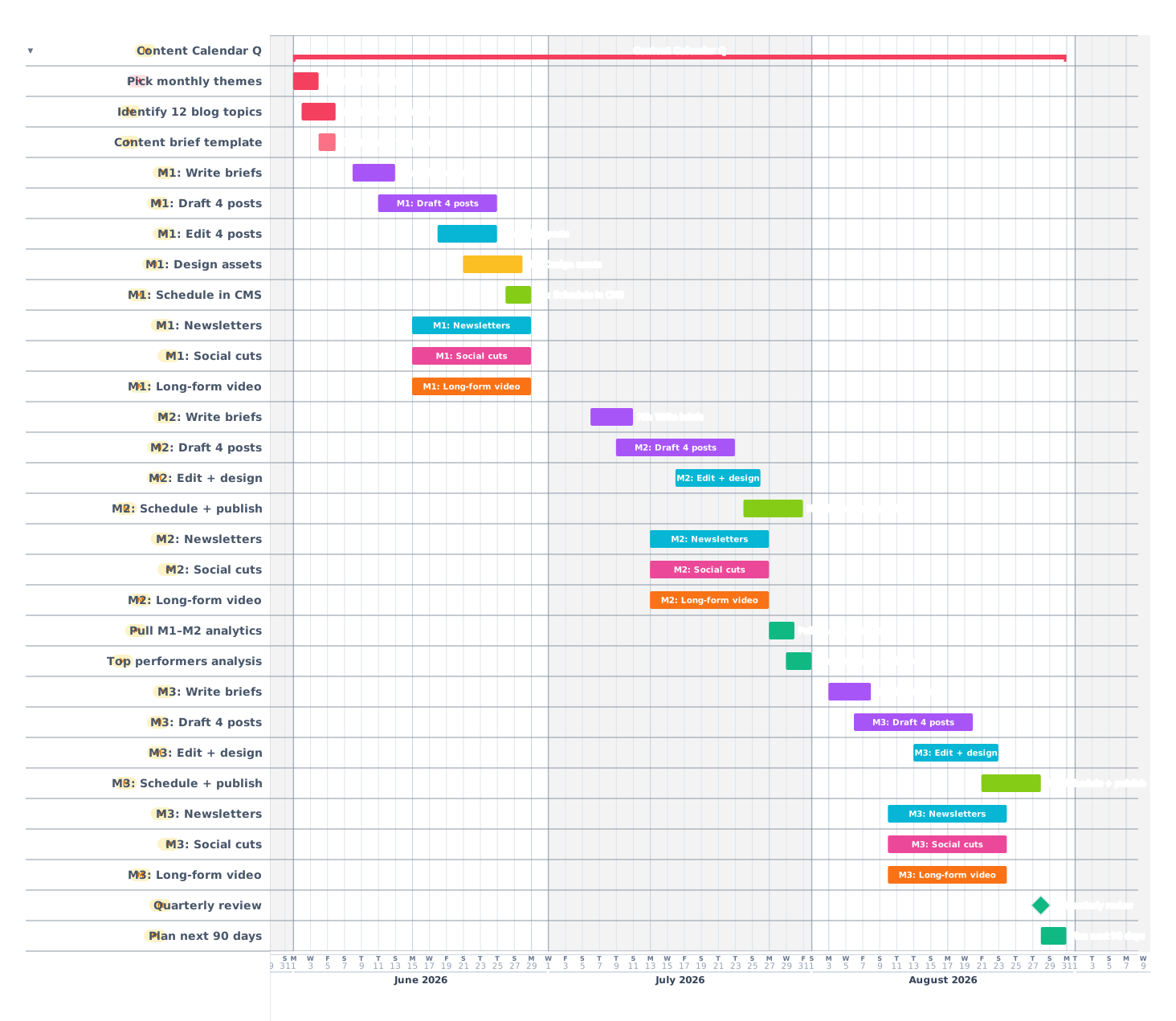
A 90-day content calendar for blog posts, newsletters, social and video, with research, drafting, editing, design and publishing plotted so nothing slips and nothing duplicates.
Content calendars fail in two predictable ways: every post is late because nothing was started early enough, or every post looks the same because there is no thematic variety. This 90-day template plots a typical content cadence (12 blog posts, 12 newsletters, daily social, 4 long-form videos) across research, drafting, editing, design and publishing phases. Themes rotate monthly to maintain variety.
How a 90-day content calendar breaks down
01
Plan and theme
Week 1
Pick 3 monthly themes that align with business goals. Identify 12 blog topics (4 per month). Build the content brief template. Sketch the editorial calendar: which post on which date. Block 2–3 hours per week for content reviews.
Pick 3 monthly themes
Identify 12 blog topics
Build content brief template
Block editorial review slots
Set publishing schedule (e.g. Tue, Thu)
02
Month 1: Build the pipeline
Weeks 2–5
Write briefs for all 4 month-1 blog posts at once. Draft, edit, design, schedule each on a 2-week cycle. By the end of month 1 you should be 1 month ahead: never publishing what was drafted yesterday.
Write 4 blog briefs
Draft 4 blog posts
Edit 4 blog posts
Design assets for each
Schedule in CMS
Build the social cuts and newsletter
03
Month 2: Steady rhythm
Weeks 6–9
By month 2 the pipeline runs at full cadence. Continue 4 blog posts per month. Send a newsletter every other week. Daily social posts using social cuts from the long-form content (one blog post fuels 5–10 social posts).
4 blog posts (drafted, edited, designed, scheduled)
2 newsletters
~30 social posts
1 long-form video
04
Month 3: Optimize and double down
Weeks 10–13
Pull the analytics from months 1 and 2. Identify the top 3 performing posts: what worked, what was the format, what was the topic. Double down on the format and topic for month 3. Drop or change underperforming themes.
Pull analytics months 1–2
Identify top 3 performing posts
Update theme plan if needed
Continue 4 blog posts
2 newsletters
~30 social posts
1 long-form video
05
Reflect and plan next quarter
Week 14
Quarterly review: what hit, what flopped, what drove email signups, what drove revenue. Build the next 90-day plan informed by what just worked.
Quarterly review meeting
Top performers post-mortem
Identify next 3 themes
Build next 90-day plan
Tips from content calendars that ran clean
01Be one month ahead at all times. Publishing what was drafted yesterday is how teams burn out.
02One long-form piece per week, repurposed into 5–10 social posts. Repurposing beats new creation 10:1.
03Pick themes that map to business goals. Random topics produce random results.
04Track top performers monthly. Doing more of what works is faster than reinventing.
05Block editorial review slots in the calendar before the quarter starts. Otherwise reviews get bumped indefinitely.
Frequently asked questions
How many blog posts per month is right?
Most B2B content programs run 4–8 posts per month. Less than 2 is hard to build an audience; more than 12 dilutes quality.
How far ahead should I plan?
Topic-level: 3 months ahead. Specific drafts: 1 month ahead. The closer to publishing, the more specific.
Should I batch produce?
Yes. Batching saves 30–40% of total time vs. one-off production. Group all drafts, then all edits, then all designs.
 Gantt Chart Maker