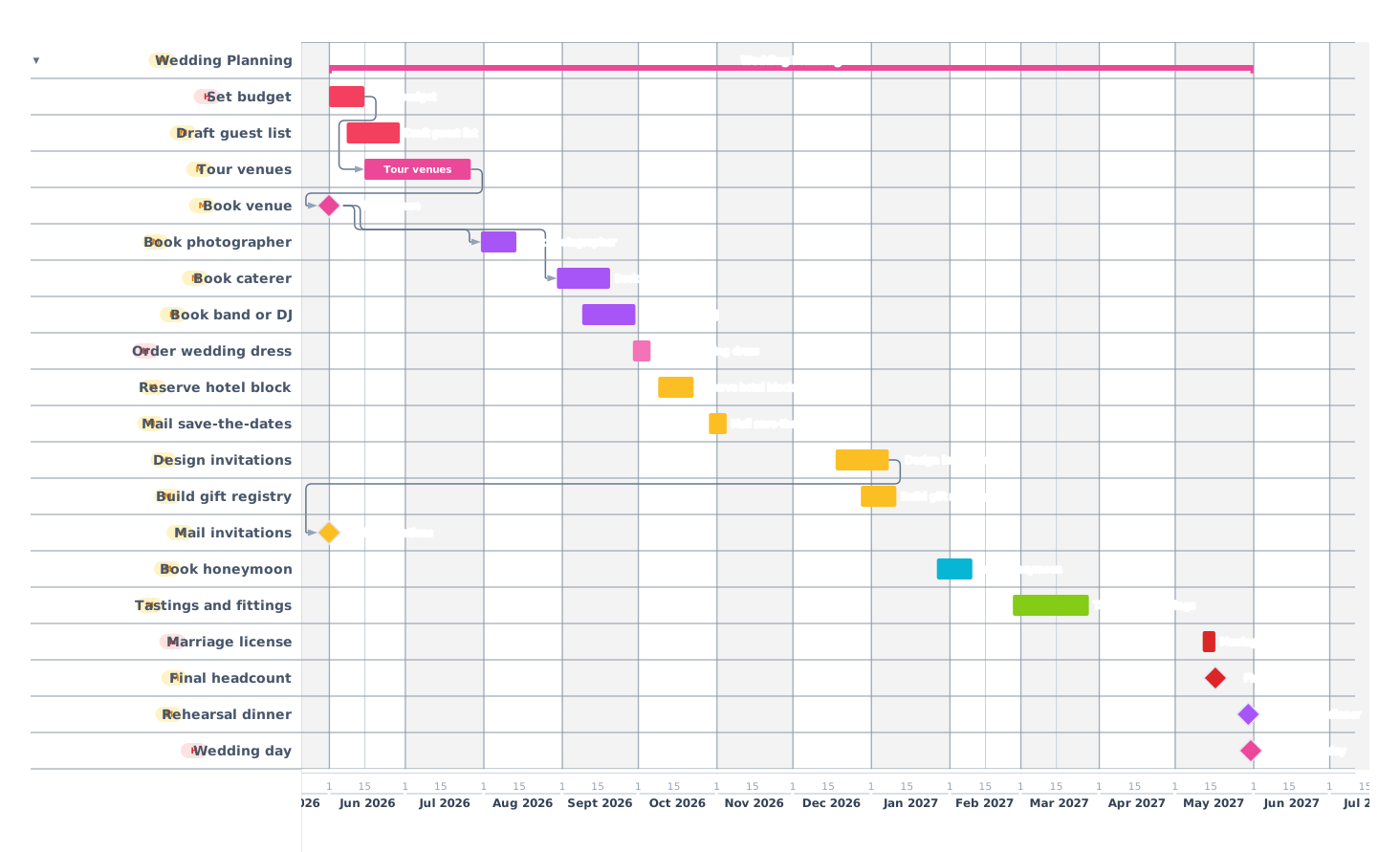
A 12-month wedding timeline with every booking, deadline and follow-up plotted out: venue, vendors, RSVPs, dress fittings, the rehearsal dinner, and the day itself.
Planning a wedding is one of the most logistically dense projects most people will ever run. There are dozens of vendors, several long-lead bookings, and at least three deadlines that, if missed, cascade into chaos (the venue, the dress, the invitations). This template lays out a 12-month wedding timeline with realistic durations so you can see at a glance what to book now, what can wait, and where the dependencies live. Open it in the app and drag any bar to fit your dates.
How a 12-month wedding plan breaks down
01
12–10 months out: Lock the foundation
Months 1–3
The big-ticket, long-lead decisions happen here: budget, guest list (preliminary), and the three things that anchor everything else: venue, date and photographer. Venues for popular dates book 12–14 months out; the photographer is the second-tightest constraint because the good ones get reserved fast. Lock these three and the rest of the plan stops being theoretical.
Set a realistic total budget and split it by category
Draft a preliminary guest list (you will revise three more times)
Tour 3–5 venues; sign with one
Book the photographer and videographer
02
9–7 months out: Build the team
Months 4–6
With venue and date confirmed, the rest of the vendor team falls into place: caterer, florist, band/DJ, officiant, hair and makeup, and the cake. The dress decision also belongs here: bridal salons quote 4–6 months for the dress to arrive plus 2–3 fittings, so ordering at month 7 leaves a comfortable buffer.
Book caterer (tasting at month 5 or 6)
Book band or DJ
Order the wedding dress and select bridal party attire
Reserve a block of hotel rooms for out-of-town guests
03
6–4 months out: Invitations and details
Months 7–9
Save-the-dates have already gone out informally; now the formal invitations get designed, printed, and mailed. Mail invitations 8 weeks before the wedding for domestic guests and 10–12 weeks for international ones. This is also when the registry goes live, the honeymoon gets booked, and the rehearsal dinner venue is reserved.
Design and order invitations
Mail invitations 8 weeks before the wedding
Build the gift registry
Book honeymoon flights and accommodations
04
3–1 months out: Confirmations and fittings
Months 10–11
The final two months are about confirming what is already booked and chasing down RSVPs. Final headcount goes to the caterer 7–14 days before the wedding, depending on the contract. Final dress fitting happens around the 3-week mark. Marriage license applications have a state-specific waiting period: apply 1–2 weeks before the wedding date.
Send final headcount to caterer and venue
Final dress and tuxedo fittings
Apply for marriage license
Confirm timeline with photographer and band
05
Wedding week: Execute and enjoy
Month 12
By this point, every decision has already been made. The week is about execution. Rehearsal dinner the night before, day-of coordinator (you or a hired one) holding the timeline, and one person designated to carry the marriage license and rings. The honeymoon begins the next morning.
Rehearsal dinner
Wedding day: day-of coordinator holds the timeline
Mail thank-you notes within 6 weeks
Tips from real wedding timelines
01Add a 10% contingency line to your budget early. Florists and caterers tend to creep up as the date approaches.
02Build the guest list before booking the venue: capacity drives the venue choice more than aesthetics do.
03Mail save-the-dates 6–8 months out, even if invitations come later. Out-of-town guests need lead time for flights.
04Schedule one weekend per month as a "no wedding planning" weekend. The longer-lead decisions benefit from a clear head.
05Keep all vendor contracts in one folder (physical or digital). The day-of coordinator will thank you.
Frequently asked questions
How far in advance should I start planning?
For a Saturday wedding at a popular venue, 12 months is the sweet spot. Six months is workable if you are flexible on venue and date.
What is the single most common dependency mistake?
Ordering invitations before the venue is confirmed. If the venue falls through, all the printed pieces have to be redone.
Can I open this template and customize it?
Yes. Click "Open this template in the app". It loads instantly, and you can drag, rename, and re-color every task. The app runs entirely in your browser. Your data never leaves the device.
 Gantt Chart Maker